6 Best Google Meet Attendance Trackers in 2026 (Tested & Compared)
I tested the most popular Google Meet attendance trackers and compared pricing, ratings and features. Find the best tracker for professionals, teams, teachers and free Gmail accounts in 2026.
The best Google Meet attendance tracker for professionals and small teams is AttendList. It's more than a browser extension: it's a complete attendance system that tracks every meeting automatically on any device, records the whole meeting even if you join late, and keeps every report in one searchable dashboard.
If you only want a free, local-only extension, MeetList is the best pick. And if your organization already pays for the right Google Workspace edition, Google Meet's built-in tracking covers the basics.
A note before we start: I'm the developer of AttendList, so I'm biased. To keep this fair, I've listed the Chrome Web Store rating, user count and last-updated date for every tracker, so you can check each one yourself.
Quick picks
- Best overall, particularly for workplaces and teams: AttendList — a full attendance system, with automatic tracking, join/leave timelines, CSV and PDF export, and a shared team dashboard.
- Best free local-only extension: MeetList — simple, popular and stores everything in your browser.
- Best if you already pay for Google Workspace: Google Meet's built-in tracking — nothing to install, but a basic report.
- Best free option for teachers: Meet Attendance Tracker — class lists and absentee detection.
Google Meet attendance trackers compared
| Tracker | Price | Rating | Users | Last updated |
|---|---|---|---|---|
| AttendList | Free plan, Pro $14/user/mo | 4.9 | 5,000+ | June 2026 |
| MeetList | Free, premium €3.99/mo | 4.7 | 400,000+ | July 2026 |
| Google Meet built-in | Paid Workspace editions only | n/a | n/a | n/a |
| Meet Attendance Tracker | Free | 4.2 | 100,000+ | July 2026 |
| Trackit | Free | 4.0 | 540 | March 2026 |
| Meet Attendance by Claycodes | Free plan, Pro $2.50/mo | 2.8 | 500,000+ | February 2023 |
Ratings, user counts and update dates are from the Chrome Web Store, checked in October 2026. Three more extensions didn't work at all when I tested them, so I've left them out of the comparison.
And here's how they compare on the features that matter most for an accurate attendance report:
| Tracker | Works on free Gmail | Tracks if you join late | Leave / rejoin timeline | Export |
|---|---|---|---|---|
| Google Meet built-in | No | Yes | No | Google Sheet |
| AttendList | Yes | Yes | Yes | CSV, PDF, Google Sheets, Google Drive |
| MeetList | Yes | No | No | Spreadsheet |
| Meet Attendance Tracker | Yes | No | No | Spreadsheet |
| Trackit | Yes | No | No | Spreadsheet |
| Meet Attendance by Claycodes | Yes | No | No | Spreadsheet |
How I tested
I installed each extension from the Chrome Web Store and joined a test Google Meet call with it enabled. I last re-tested every extension in October 2026. For each tracker, I checked:
- Does tracking start? Several popular extensions failed at this first step.
- What's in the report? Join time and total duration are the basics. The better trackers also show when someone left and rejoined.
- Can you export it? And in which formats.
- Is it maintained? Google Meet's interface changes often, and extensions that aren't updated tend to break.
1. AttendList
Best overall: a professional-grade attendance system for professionals and small teams.
Rating: 4.9/5 ★★★★★ on the Chrome Web Store · Users: 5,000+ · Last updated: June 2026
Price: Free Basic plan (5 attendance reports per week). Pro is $14 per user per month with a 14-day free trial. See pricing.
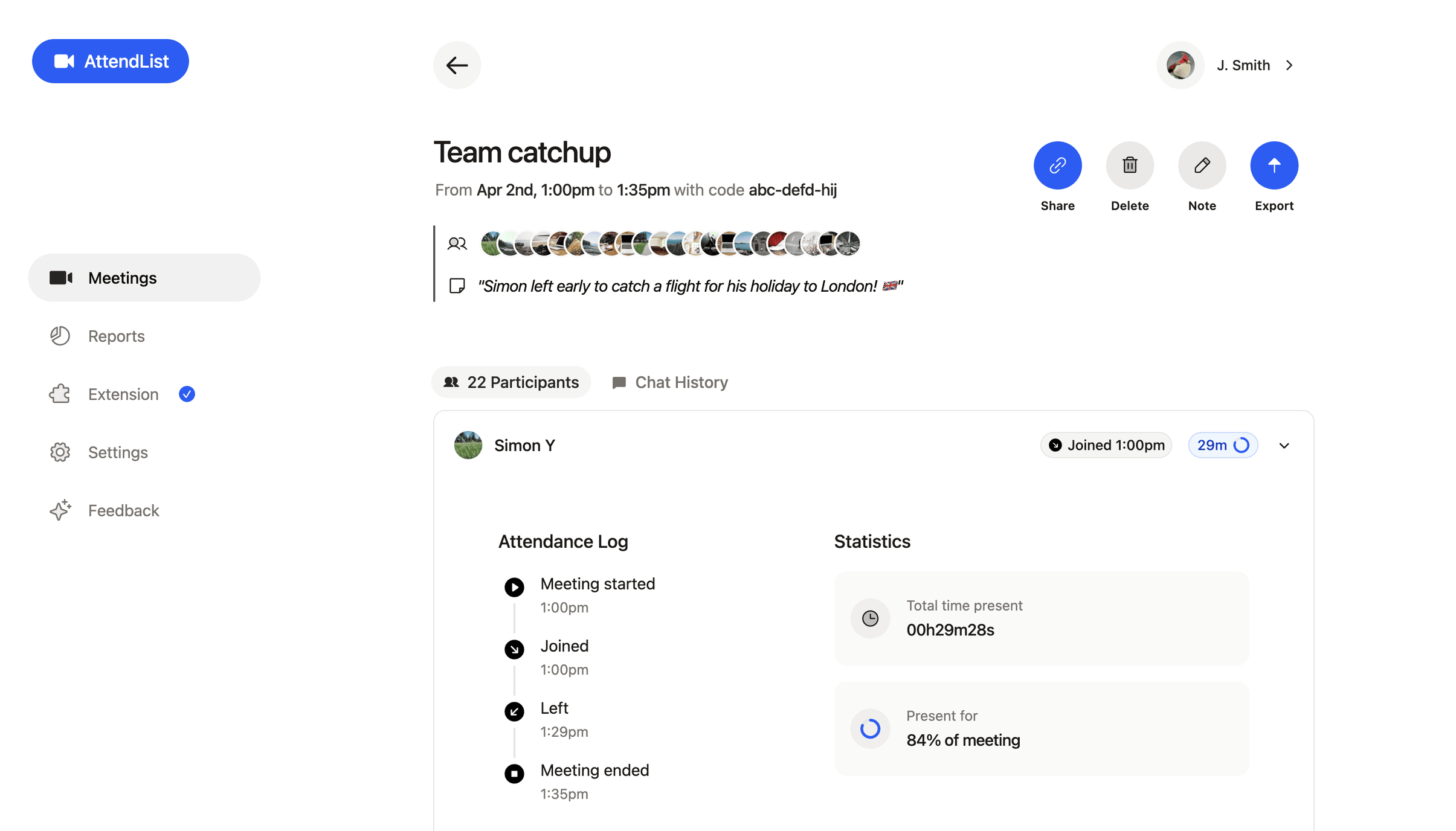
AttendList is the most complete Google Meet attendance tracker I tested, and the only one on this list that's more than an extension.
Every other tracker here is a Chrome extension that produces a one-off report for the meeting you're in. AttendList is an attendance system:
- a web app that holds every meeting's report,
- a history for each participant,
- report exports and integrations,
- plus a shared workspace for your team.
It's built for people who track attendance as part of their job — consultants, trainers, managers and small teams who need records they can rely on.
It also doesn't rely on a browser extension being open in the meeting. You connect your Google account once, and it automatically tracks attendance in every Google Meet you join — on your phone, tablet or computer.
That also means it records the whole meeting. If you join ten minutes late or leave early, the report still runs from the first person joining to the last person leaving.
AttendList features
- Automatic tracking on any device: Connect your Google account and every meeting you join is tracked. There's nothing to click, and it works on mobile. Learn how auto attendance works.
- Full attendee timelines: See when each person joined, left and rejoined, rather than a single total duration.
- Tracks the whole meeting: Attendance is recorded from the start of the meeting, even if you join partway through.
- Participant overview: See every meeting a person has attended, and their attendance over time.
- CSV and PDF export: Export attendance reports as a spreadsheet or PDF, or have them sent automatically to Google Drive, Google Sheets or your inbox.
- Built for teams: Invite your team into a shared workspace. Owners and admins see every report in one central dashboard, while members see their own. The Pro plan adds an API for connecting attendance data to your other systems.

To use the words of an AttendList user:
Super easy to set up, very clean and modern UI. And this one actually works really well! — Miguel, 2025 (via Chrome Web Store reviews)
You can start tracking your Google Meet attendance for free.
AttendList Pros & Cons
| Pros | Cons |
|---|---|
| Automatic on any device — tracks every Google Meet you join, including on mobile, with no extension required. | Free plan is limited — the Basic plan includes 5 reports per week and 14 days of history. Unlimited reports need Pro. |
| Most detailed report — a full join, leave and rejoin timeline for every attendee. | Requires an account — you sign in with Google, rather than storing data only in your browser. |
| Records the whole meeting — even if you join late or leave early. | |
| Exports and integrations — CSV, PDF, Google Drive, Google Sheets and email. | |
| A full attendance system, not just an extension — a dashboard of every meeting, participant histories and a shared team workspace. |
2. MeetList
Best free, local-only attendance tracking extension.
Rating: 4.7/5 ★★★★☆ on the Chrome Web Store · Users: 400,000+ · Last updated: July 2026
Price: Free, with ads and limits. Premium is €3.99/month or €33.30/year.

MeetList (listed as "Google Meet Attendance List") is the most popular working tracker on the Chrome Web Store, and it's refreshingly straightforward.
I installed the extension, joined a meeting, and MeetList handled the tracking. Everything is stored locally in your browser.
Here's the attendance report from after the test meeting:

MeetList's attendance report includes:
- Meeting information: the name, code, duration and time of each meeting,
- Participants: who joined, and when they first joined,
- Total time: how long each person was in the meeting.
It also has a spreadsheet export with the same information.
There are two limitations to know about:
- The report lacks detail. It shows who joined and for how long, but not whether attendees left and rejoined.
- It only records while you're in the meeting. If you join late, you miss the start. If you leave early, tracking stops.
Neither is unreasonable for a free extension, but both are things AttendList handles.
MeetList Pros & Cons
| Pros | Cons |
|---|---|
| Easy to use — install it, join a meeting, and it works. | Only tracks while you're present — and only on desktop Chrome. |
| Nails the basics — join time and total time present for each person. | No rejoin timeline — you only get a total duration. |
| Actively maintained — updated in July 2026. | Ads & limits — free users get advertising and limits, unless they pay for premium. |
3. Google Meet built-in attendance tracking
Best if you already pay for the right Google Workspace edition.
Price: Included with Google Workspace Essentials, Business Plus, Enterprise, Education Plus and the Teaching and Learning Upgrade. Not available on free Gmail accounts.
Google Meet has built-in attendance tracking, but only on certain paid Google Workspace editions.
You turn it on from Host controls inside the meeting, or from the Google Calendar event. After the meeting, the organizer is emailed a Google Sheet with each participant's name, email, time joined, time exited and duration. Education Plus and Teaching and Learning Upgrade users get the report automatically.
It's the simplest option, since there's nothing to install. But the report is basic:
- No rejoin detail. If someone leaves and rejoins, you only see their overall duration, not each join and leave.
- Only the organizer gets it. If you didn't create the meeting, you won't receive the report.
- No dashboard. Each report is a separate spreadsheet in your inbox, so there's no history across meetings.
I've written a full walkthrough in how to get a Google Meet attendance report.
Google Meet built-in tracking Pros & Cons
| Pros | Cons |
|---|---|
| Nothing to install — it's part of Google Meet. | Paid Workspace editions only — not available on free Gmail or lower Business plans. |
| Includes emails — the report lists each participant's email address. | Basic report — no leave and rejoin timeline. |
| Covers breakout rooms — with a separate tab per room. | Organizer only — nobody else receives the report. |
4. Meet Attendance Tracker
Best free attendance tracker for teachers.
Rating: 4.2/5 ★★★★☆ on the Chrome Web Store · Users: 100,000+ · Last updated: July 2026
Price: Free.

Meet Attendance Tracker is aimed specifically at teachers.
It lets you set up classes within the extension, and then detects absent students once you've generated a report.
It's not the prettiest extension, but it gets the job done, and the teacher-specific features are a real standout. It's also actively maintained, with an update in July 2026.
Meet Attendance Tracker Pros & Cons
| Pros | Cons |
|---|---|
| Education features — class lists and absentee detection, aimed at teachers. | Clunky interface — the reporting interface is a bit confusing. |
| Actively maintained — updated in July 2026. |
5. Trackit
Solid local-only extension, with support for in-person events.
Rating: 4.0/5 ★★★★☆ on the Chrome Web Store · Users: 540 · Last updated: March 2026
Price: Free.

Trackit is another local-only Google Meet attendance tracker. You install it, log in, and tracking happens automatically.
Its report covers the basics — who attended, when they first joined, and how long they were present. It's similar to MeetList, with similar pros and cons, but a far smaller user base.
One unusual feature is support for in-person events. Trackit has a flow for scanning QR codes to register in-person attendance, which no other tracker on this list has.
My favorite detail is the recording indicator it shows in Google Meet while it's tracking attendance:

Trackit Pros & Cons
| Pros | Cons |
|---|---|
| Recording indicator — makes it clear when attendance is being tracked. | Basic report — only who joined, and for how long. |
| Easy to get started — simple to install and start using. | Small user base — around 540 users, with only minor updates. |
| In-person attendance — QR code check-in for physical events. |
6. Meet Attendance by Claycodes
Clunky, but functional.
Rating: 2.8/5 ★★☆☆☆ on the Chrome Web Store · Users: 500,000+ · Last updated: February 2023
Price: $2.50/month.

Despite the poor reviews, this extension did work.
After a few minutes of fiddling, and rejoining a meeting a few times, I was able to download an attendance spreadsheet. The process was very clunky, though, and the extension hasn't been updated since February 2023, so don't expect improvements.
AttendList and MeetList both do everything this extension does, and are much easier to use.

Meet Attendance by Claycodes Pros & Cons
| Pros | Cons |
|---|---|
| Functional — it does produce an attendance spreadsheet. | Clunky — confusing to set up and use. |
| Huge user base — over 500,000 users. | Unreliable — many reviews say it records incorrect times for attendees. |
| Not maintained — last updated in February 2023. | |
| Paid — $2.50/month, when better options are free. |
Trackers that didn't work
Google Meet's interface changes regularly, and extensions that don't keep up break. These three failed in my testing, so I'd avoid them for now.
Attendance for Google Meet™
Rating: 4.0/5 on the Chrome Web Store · Users: 40,000+ · Last updated: July 2026

This is a popular tracker, with over 40,000 users, and it's still being updated. But when I tested it, the extension didn't detect that I was in a Google Meet call, so I couldn't start attendance tracking.
I tested it again in October 2026, after its July 2026 update, and it still failed. It has decent reviews, so it must work for some people, but I'd start with one of the options above.
Attendance for Google Meet (a different extension, same name)
Rating: 3.9/5 on the Chrome Web Store · Users: 30,000+ · Last updated: April 2023

This extension threw an error when I tried to open its window inside Google Meet. It seems to have been designed for an older version of Google Meet, and it hasn't been updated since April 2023.
It's a shame, because it has solid features for classrooms and breakout rooms, and a nicely color-coded spreadsheet export. I just couldn't get it to record anything.
Meet Assistant

Meet Assistant hasn't been updated since 2021. It's incompatible with current versions of Chrome and can't be installed.
Which Google Meet attendance tracker should you choose?
- For professionals and small teams: AttendList is the only option here that works as a complete attendance system rather than a single-meeting extension: automatic tracking on every device, the most detailed reports, a history for every participant, and a shared dashboard for your team. See pricing.
- For teachers: if your school has Education Plus or the Teaching and Learning Upgrade, start with Google Meet's built-in tracking. If not, or if you need to see who dropped out mid-class, use AttendList or the free Meet Attendance Tracker.
- For a free, local-only extension: MeetList is the most popular working option.
- Without Google Workspace: every third-party tracker here works with a free Gmail account. Only Google's built-in tracking needs a paid plan.
Conclusion
There are plenty of Google Meet attendance trackers to choose from, but many of the popular ones are clunky, basic or abandoned.
If you track attendance for work, AttendList is the best choice — it's a professional-grade attendance system rather than just an extension, and it's free to start using. If all you need is a quick one-off list, a free extension like MeetList will do.
You can read more about how to get a Google Meet attendance report with AttendList, or get started with AttendList now.
Frequently asked questions
Which Google Meet attendance tracker is best for teachers?
If your school pays for Google Workspace for Education Plus or the Teaching and Learning Upgrade, Google Meet's built-in attendance tracking emails you a basic report automatically. If it doesn't, or you need to see who left and rejoined during class, AttendList works with any Google account and records a full timeline for every student. Meet Attendance Tracker is a free alternative with class lists and absentee detection.
Which Google Meet attendance trackers are free?
Trackit and Meet Attendance Tracker are free Chrome extensions, and MeetList is free with an optional premium plan. AttendList has a free Basic plan that includes 5 attendance reports per week, with a Pro plan at $14 per user per month for unlimited reports. Google Meet's built-in attendance tracking is not free: it requires a paid Google Workspace edition.
Do participants need to install anything?
No. Only the person tracking attendance sets anything up. Everyone else joins the Google Meet call as normal.
Which attendance tracker works without Google Workspace?
All of the third-party trackers in this list work with a free Gmail account, including AttendList and MeetList. Only Google Meet's built-in attendance tracking requires a paid Google Workspace edition.
How do attendance trackers handle someone who leaves and rejoins?
It varies. Google Meet's built-in report and most extensions only show an overall duration for each person. AttendList records each join and leave separately, so you get a timeline showing exactly when someone dropped out and came back.
Can I track attendance if I join the meeting late?
Extensions that run only in your browser can only record what happens while you are in the call. AttendList tracks attendance from the start of the meeting until the last person leaves, even if you join late or leave early. Google Meet's built-in tracking also covers the whole meeting.
Can I track Google Meet attendance on my phone?
Chrome extensions only work on desktop. AttendList connects directly to your Google account, so it tracks attendance in every Google Meet you join, whether that's from your phone, tablet or computer. Google Meet's built-in tracking also works on mobile for supported Workspace editions.
Can I export a Google Meet attendance report to a spreadsheet or PDF?
Yes. Most trackers export a spreadsheet. AttendList exports CSV on every plan, and adds PDF export plus automatic delivery to Google Drive, Google Sheets and email on the Pro plan. Google Meet's built-in tracking emails the organizer a Google Sheet.
About the author
Harrison Broadbent
Harrison is the creator of AttendList, an attendance management system for Google Meet. As the founder, he builds the product, answers the support chat... and writes these guides!