Enable/disable auto attendance
Enable or disable automatic attendance tracking via our Chrome Extension
AttendList supports automatically tracking attendance in any meeting you join, via the "Auto Attendance" option.
This is handy for most people (so you don't have to remember to track attendance every time you join a meeting). This setting is enable by default when you install the AttendList Chrome Extension.
If you want to disable this setting, just un-tick the "Auto Attendance" setting in the AttendList Chrome Extension panel:
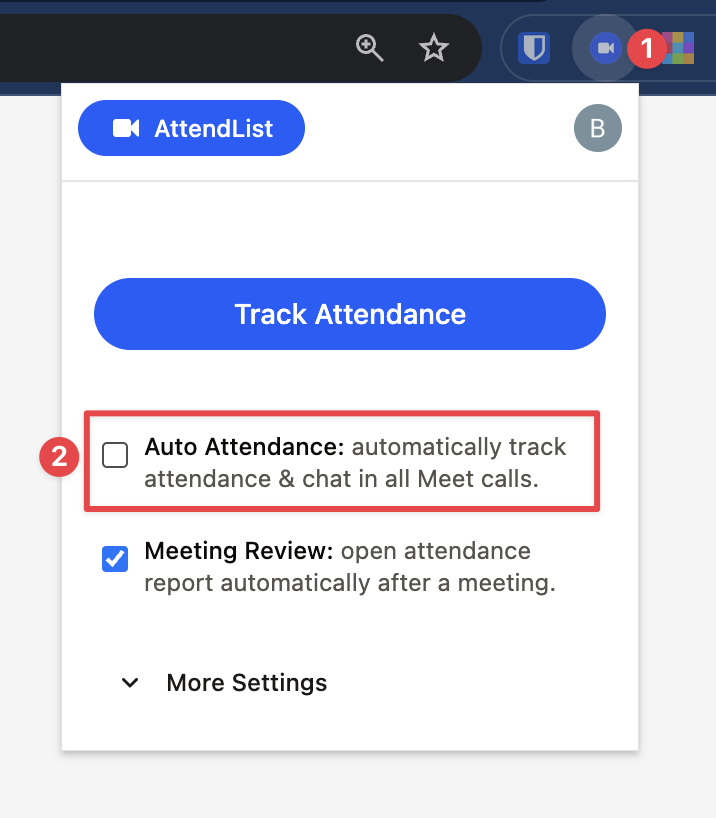
To enable/disable auto-attendance tracking via AttendList, use the setting available in the extension panel.
Remember: with auto-attendance disabled, you'll have to remember to click "Track Attendance" every time you join a Google Meet meeting in which you want to record an attendance report.